
CDisplayEx Comic Reader
Progdigy SoftwareComics
4.9621.00 Reviews
- Version
- Varies With Device
- Installs
- 100.00K
- Age Rating
- Everyone
Screenshots
Our Review of CDisplayEx Comic Reader
 Analysis by Appyee
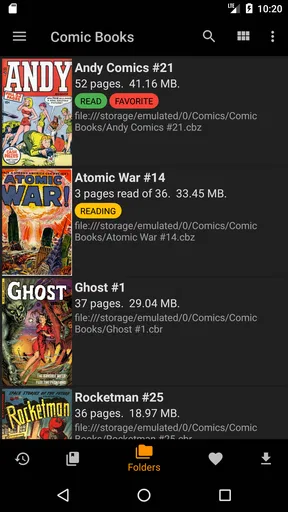
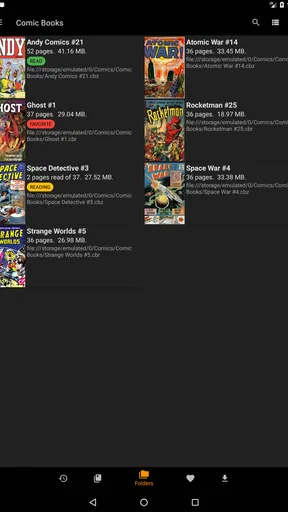
My first advice with a comic reader is to check how your files are organized before blaming the app when a book is hard to find. A folder full of mixed downloads can make any library feel confusing, especially if filenames are vague or several volumes look alike. I get the best results when I keep series together and use clear names, so the next chapter is easy to spot. That simple bit of housekeeping matters more than it sounds when you’re browsing on a small screen.
Where a reading session can snag
CDisplayEx Comic Reader is a paid comics app from Progdigy Software, and it is aimed at reading a personal collection rather than serving as a storefront for discovering and buying stories. That distinction is worth knowing before you install it: if you expect a subscription catalog or recommendations for what to read next, a comics service built around licensed online content may suit you better. If you already have comics to open, a dedicated reader is a more natural fit.
The app’s rating is strong, with a 4.9 average from around 8,200 ratings, and it has passed 100,000 installs. Those figures suggest that many readers find it useful, but they don’t guarantee that every file or device setup will behave the same way. I’d treat compatibility with your own collection as the deciding factor, rather than assuming a popular reader will automatically solve every import or display problem.
A few checks before you start
Before settling in, I’d confirm that the comic is actually stored on the device or in a location the reader can access. If a book is missing, first check the folder where it was saved and make sure you’re looking at the right part of your collection. A reader can only show files that are available to it; reorganizing folders or moving downloads can also make a familiar book appear somewhere unexpected.
For a comfortable first session, open one comic and test the display before importing or sorting a large collection. Try the single-page and double-page options against the kind of book you read most. A phone usually makes individual pages easier to inspect, while a tablet can make a two-page spread feel more natural. If text looks too small, zooming can help, but it’s worth trying a different page layout first so you don’t have to pan around every panel.
Getting back into a book
Bookmarks and the remembered last page are useful in slightly different ways. I’d rely on the last-page position when reading one book from beginning to end, and use a bookmark when I want to keep a particular page easy to revisit. That distinction is handy for reference-heavy comics or when I’m comparing artwork, and it gives me a more reliable way to return than trying to remember a chapter or page number.
If a reading session is interrupted, I’d reopen the same book and check the saved position before assuming progress has been lost. When I switch between several books, I also make a point of using a bookmark for the one I intend to return to later. It is a small habit, but it prevents the common annoyance of opening a title and having to search for the scene I was reading.
When the problem may be elsewhere
A slow or awkward page is not always a sign that the reader itself is at fault. Very large image files, an incomplete download, or an archive that is damaged can all affect what appears on screen. If one comic behaves differently from the rest, I’d test another file before changing every display setting. If several books have the same problem, then it makes sense to review the reading layout and how the collection is arranged.
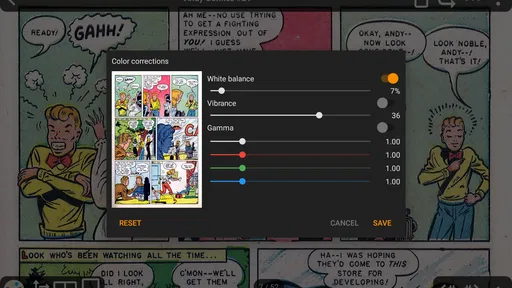
Screen comfort is personal, too. Night mode can be welcome in a dim room, but it does not make every display equally comfortable, and a dark setting is not automatically best for every comic’s colors. I’d adjust brightness to the room and check a few pages with different artwork before deciding on a default. A display choice that works for line art may not be ideal for a richly colored page.
Reading with a personal collection
If you're a comic book enthusiast like me, you know how essential it is to have the right tool to enjoy your favorite stories. Enter CDisplayEx Comic Reader, an app that promises to enhance your comic reading experience on Android and iOS. Let's dive into what makes this app a go-to choice for many comic fans.
First Impressions
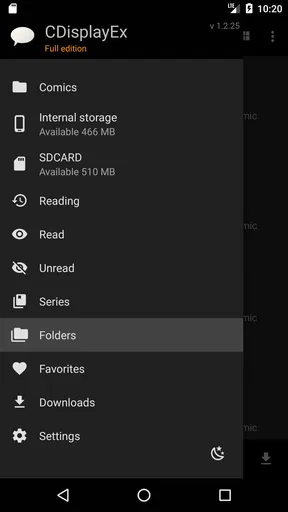
Upon launching CDisplayEx Comic Reader, I was immediately struck by its clean and intuitive interface. The app is designed to make navigation a breeze, ensuring that even first-time users can find their way around without a hitch. The home screen displays your library, allowing you to quickly jump into your collection or explore new titles. What caught my eye was the smoothness of the transitions and how organized everything felt right from the start.
Features that Stand Out
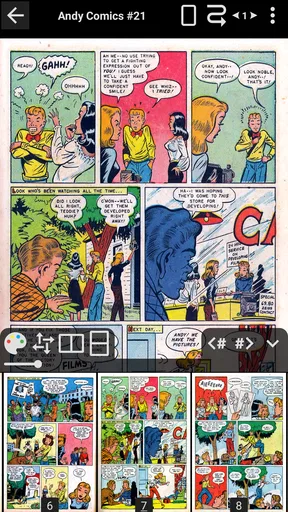
The app comes jam-packed with features aimed at enhancing your reading experience. One of my favorites is the customizable reading options. Whether you prefer single-page or double-page views, this app has got you covered. It even supports a wide range of comic book formats, like CBR, CBZ, PDF, and more, so you're not limited in what you can read.
Another notable feature is the zoom functionality, which is buttery smooth. You can easily zoom in on those intricate details or pull back to get a full-page view. The app also supports bookmarks, so you can easily pick up where you left off, and it remembers your last read page, which is a lifesaver for someone as forgetful as I am!
Performance and User Experience
Performance-wise, CDisplayEx Comic Reader is a powerhouse. It loads comics quickly, and I didn't experience any lag or crashes during my use. The app is optimized for both tablets and smartphones, ensuring a seamless experience across different devices. I found the reading experience to be immersive, thanks to the app's ability to handle high-resolution images without breaking a sweat.
The user experience is further enhanced by the app's night mode. This feature is perfect for late-night reading sessions, reducing eye strain and making it easier to enjoy your comics without disturbing your sleep cycle.
Personal Touch: My Experience
Using CDisplayEx has been a game-changer for me. I've always been a fan of reading comics on the go, and this app fits perfectly into my lifestyle. The ability to carry my entire comic collection in my pocket is incredibly convenient. Plus, the app's offline reading capability means I can enjoy my comics anywhere, without worrying about internet connectivity.
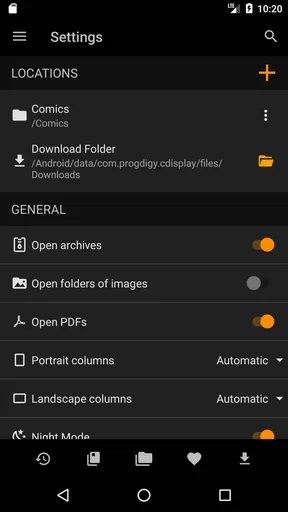
I also appreciate the level of customization the app offers. From adjusting the brightness to changing the background color, I can tailor my reading experience to suit my preferences, making each session truly personal and enjoyable.
Practical fit and final thoughts
In practical terms, I think this reader is best for someone who already has a collection and wants control over how each page looks. A casual reader who opens a comic now and then can still benefit from the straightforward reading tools, but the value is clearer if you regularly move between titles, revisit pages, or read on both a phone and a larger screen. Someone who wants a built-in shop, curated recommendations, or an online library should look at a catalog-based alternative instead.
A realistic use for me is downloading a volume before leaving home, checking that it opens, and then reading a few pages during a commute without depending on a connection. When I get home, I can continue from the remembered page, while a bookmark preserves a scene I want to discuss or inspect again. This workflow keeps the app focused on reading rather than requiring me to treat every session as a fresh start.
The format support is helpful, but it does not remove every file-management chore. If a comic is packed in an archive that the app cannot read cleanly, or the download itself is incomplete, changing zoom or page mode will not repair it. I’d keep an original copy of important files and test a sample before committing to a large transfer. For a collection spread across devices, I’d also decide on a consistent folder structure rather than expecting the reader to organize every file automatically.
Compared with reading through a general file viewer, a dedicated comic app makes page navigation and reading layouts the priority, which is the main reason I’d choose this one for a local library. Compared with a digital comics storefront, it offers a different kind of convenience: it is for opening books you already have, not replacing the process of finding or purchasing them. Neither approach is universally better; the right choice depends on whether your collection or content discovery is the main concern.
The app is listed for $5.99 and is marked for Everyone, so I’d think of the purchase as a decision about a focused reading tool rather than a free way to browse a catalog. It was released on April 15, 2018, and Progdigy Software is the developer. For a reader who expects to use local comics often, paying for a comfortable, repeatable reading workflow may make sense; for someone who only wants occasional access to titles from a service, a different model may be more convenient.
There are also a few sensible expectations to keep in mind. A tablet can make spreads and detailed artwork easier to enjoy, but it does not make every comic legible at a glance; some pages still benefit from zooming. On a phone, single-page reading is often less fiddly, while double-page mode may force more zooming than it saves. I’d treat these settings as choices to make per reading situation, not as a one-time setup that will suit every book.
When something goes wrong, I’d narrow it down rather than resetting everything. Check whether the issue affects one file or the whole library, confirm the file is where you expect it, and try another comic in the same format. If only one title fails, the file or its download is a reasonable place to start. If every book feels difficult to read, revisit page layout, brightness, and zoom before deciding the app is the cause.
In conclusion, CDisplayEx Comic Reader is a must-have for any comic book lover. Its combination of a user-friendly interface, robust features, and high performance makes it an ideal choice for reading comics on your mobile device. Whether you're a casual reader or a die-hard collector, this app delivers a top-notch experience.
If you're looking to enhance your comic reading experience, give CDisplayEx Comic Reader a try. It's available on both Android and iOS, and I promise you won't be disappointed. Happy reading!
Verdict
Strengths of CDisplayEx Comic Reader
- Smooth page transitions enhance reading experience.
- Supports a wide range of comic file formats.
- Customizable viewing options for personal preference.
- Fast loading times for large comic files.
- User-friendly interface with easy navigation.
Limitations of CDisplayEx Comic Reader
- Ads can be intrusive in the free version.
- Limited cloud service integrations available.
- No built-in store for purchasing comics.
- Lack of advanced annotation features.
- Occasional crashes on older devices.
Other Releases by Progdigy Software
View All
CDisplayEx Comic Reader Lite
Comics4.0
Similar Picks in This Category
View All
WEBTOON: Manga, Comics, Manhwa
NAVER WEBTOON4.6

MangaToon: Comic & Manga
MangaToon4.3

네이버 웹툰 - Naver Webtoon
NAVER WEBTOON4.3

Tapas – Comics and Novels
Tapas Entertainment Inc.4.2

Lezhin Comics - Daily Releases
LEZHIN ENTERTAINMENT3.3

WebComics - Webtoon & Manga
WEBCOMICS HOLDINGS HK LIMITED4.4
Frequently Asked Questions
What file formats does CDisplayEx Comic Reader support?
CDisplayEx Comic Reader supports a wide range of comic book formats, including CBR, CBZ, PDF, and EPUB. This versatility ensures that users can read almost any comic file they have. The app’s ability to handle high-resolution images smoothly enhances the reading experience.
Is CDisplayEx Comic Reader available on both Android and iOS?
Yes, CDisplayEx Comic Reader is available on both Android and iOS platforms, making it accessible to a wide audience. Users can download the app from the Google Play Store or the Apple App Store, ensuring compatibility with their preferred devices.
Does CDisplayEx Comic Reader offer any customization options?
Absolutely, CDisplayEx Comic Reader provides a variety of customization options, allowing users to adjust the reading mode, background color, and page layout. These features help tailor the reading experience to individual preferences, making it more enjoyable and personalized.
Are there any in-app purchases or ads in CDisplayEx Comic Reader?
CDisplayEx Comic Reader offers both free and premium versions. The free version includes ads, while the premium version removes them and offers additional features. Users can opt for the premium upgrade to enjoy an ad-free experience and access to enhanced functionalities.
How does CDisplayEx Comic Reader handle large comic libraries?
CDisplayEx Comic Reader is designed to efficiently manage large comic libraries. It features a robust library management system that allows users to organize comics by series, author, or title. The app’s search function also makes it easy to find specific comics quickly.
